
AmplerProductivity and brand compliance inside Microsoft Office
Ampler is the productivity suite that installs as a native tab inside Microsoft Office: build flawless presentations, workbooks and documents in a fraction of the time, with your company content and branding always at hand.
What is Ampler?
Ampler is an enterprise productivity solution that integrates with Microsoft Office through native add-ins. Once installed, it works as a tab inside PowerPoint, Excel, Word and Outlook — every feature stays within your workflow, with no need to switch between systems.
OSB Software supplies Ampler in Brazil with localized licensing and invoicing in reais. From consultancies and finance teams to marketing, engineering and IT, the value rests on three pillars: higher productivity, content standardization and corporate control.
One toolbar, four applications
Ampler lives inside the Office your team already uses — no new system to learn.
How Ampler speeds up your work
From the first slide to the final review, without leaving Microsoft Office:
Install
Ampler shows up as a native tab in Office. No new system to learn, no window switching.
Create
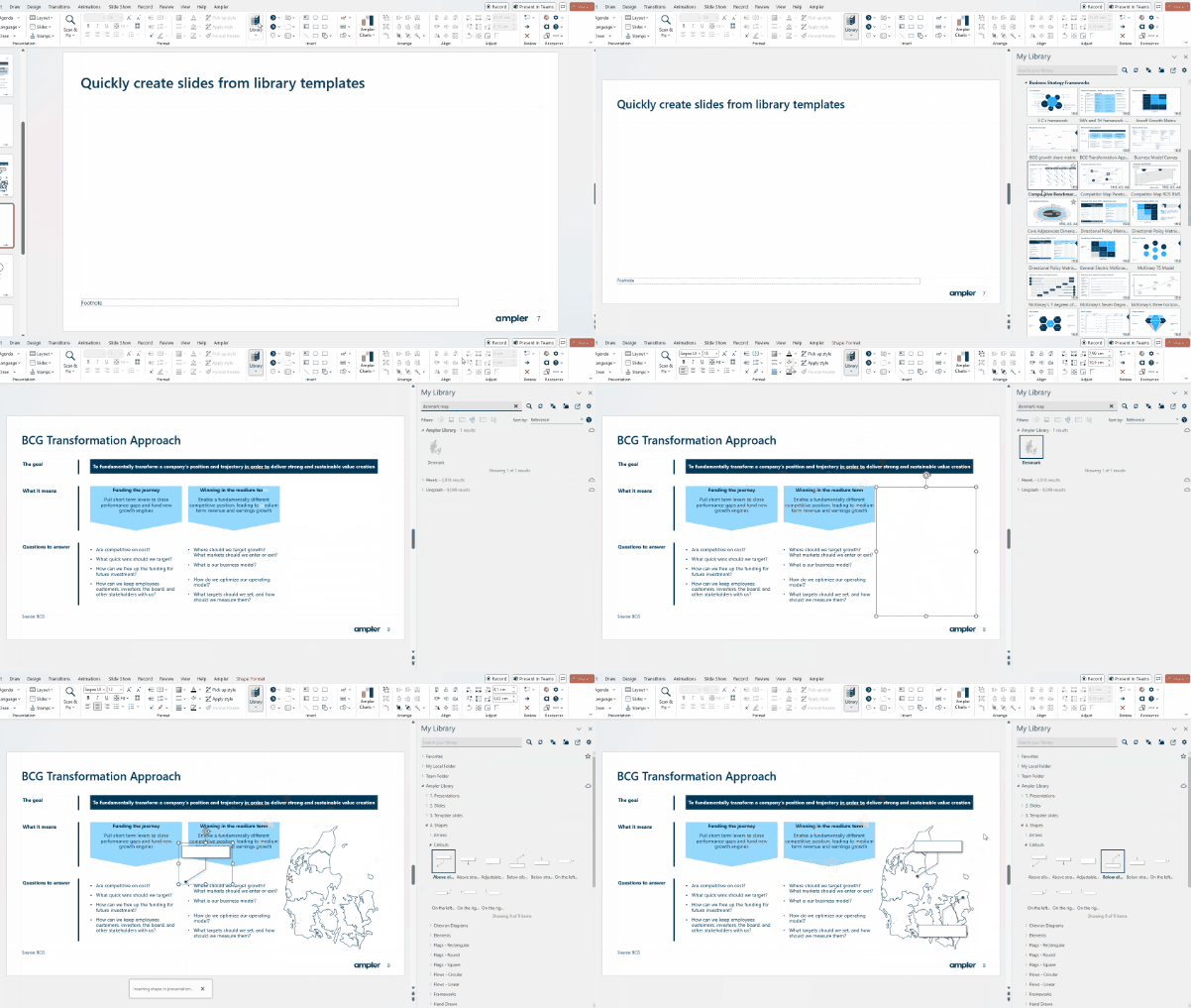
Start from the company's official template, build the structure in Storyboard and pull ready content from the Library.
Standardize
Instant formatting, charts and signatures follow the visual identity defined by your organization.
Review
Scan & Fix sweeps the file and corrects inconsistencies before you send it to the client or the board.
Ampler in every Office application
Ampler for PowerPoint delivers perfect presentations in a fraction of the time, from the first slide to the final review.
New Presentation
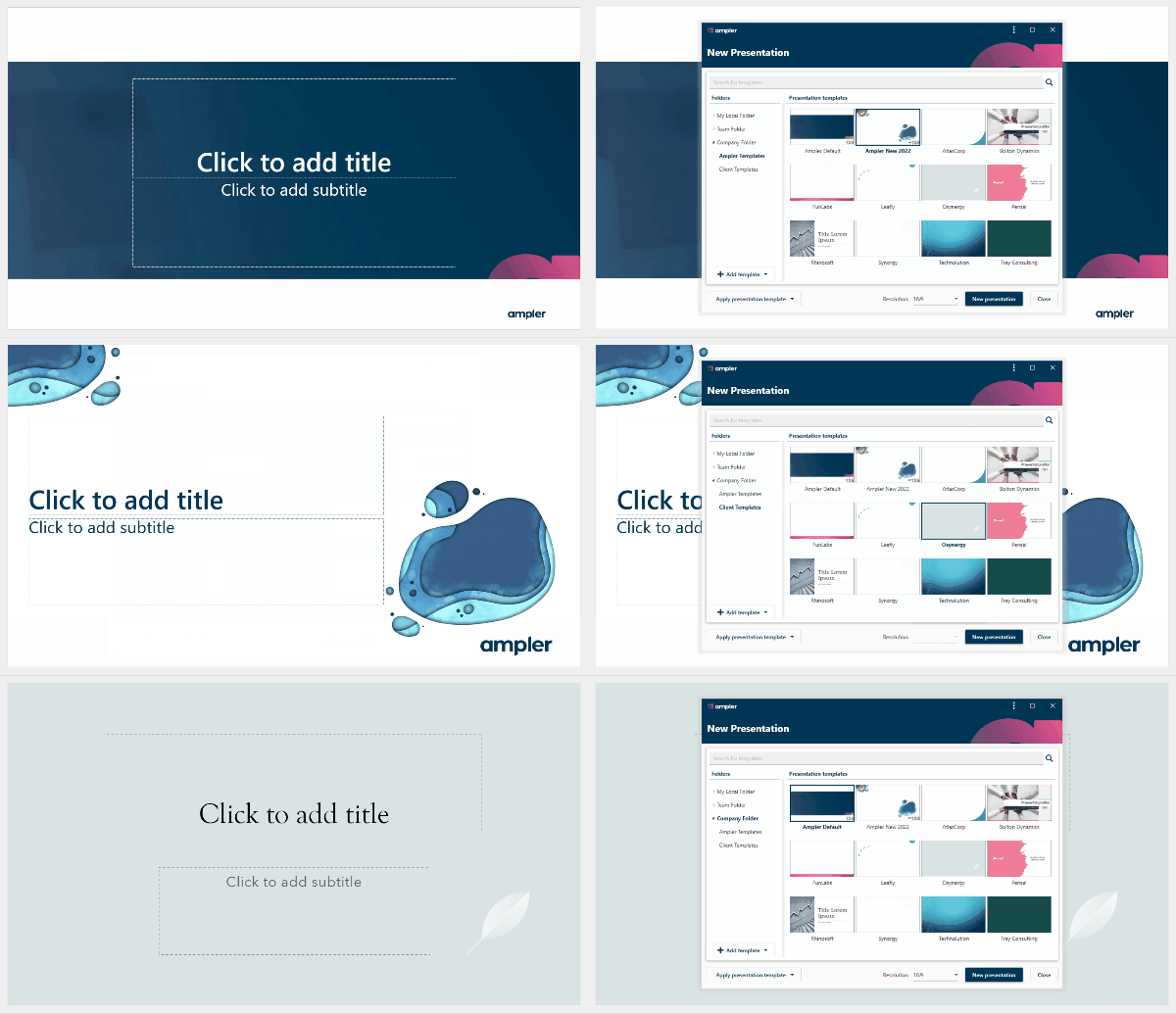
Company and client templates in one click, with the right slide master already in place.
Agenda
Instantly create the perfect agenda and track it throughout the presentation, with no manual setup.
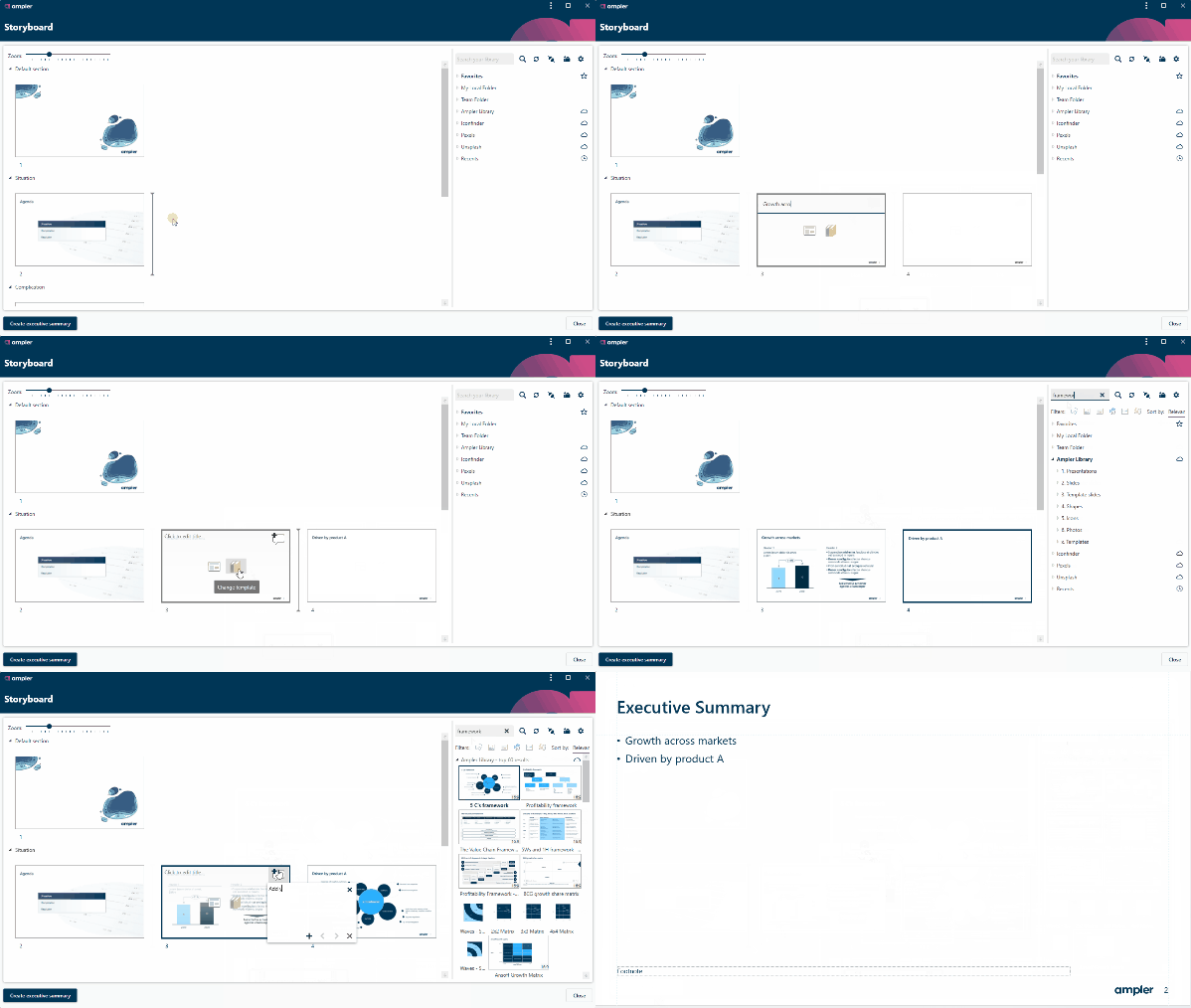
Storyboard
A simple environment for building and editing your story line before drawing the slides.
Time Savers
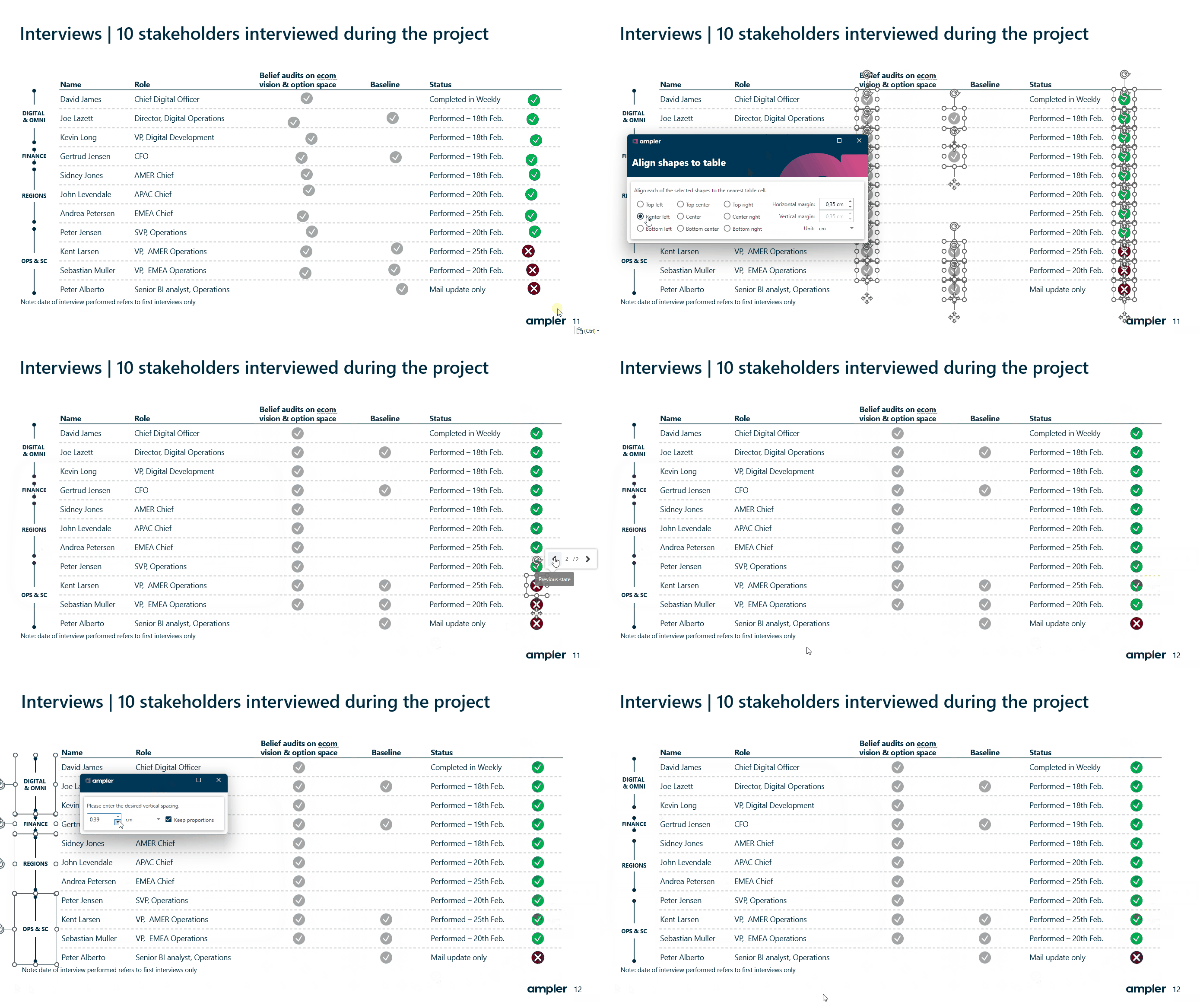
Dozens of alignment, distribution and formatting functions that remove repetitive work.
Scan & Fix
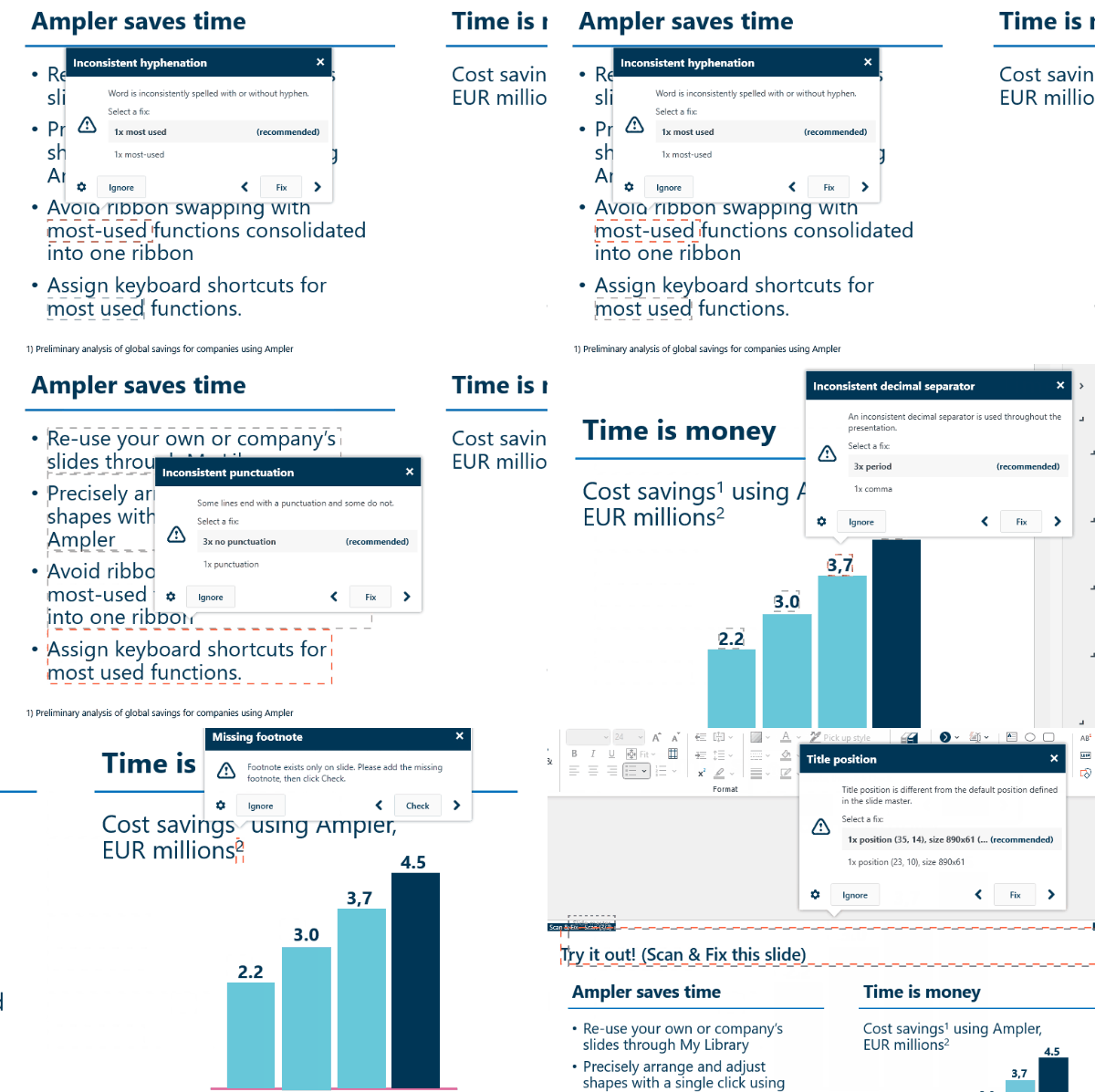
An automatic sweep that catches and corrects inconsistencies and formatting problems.
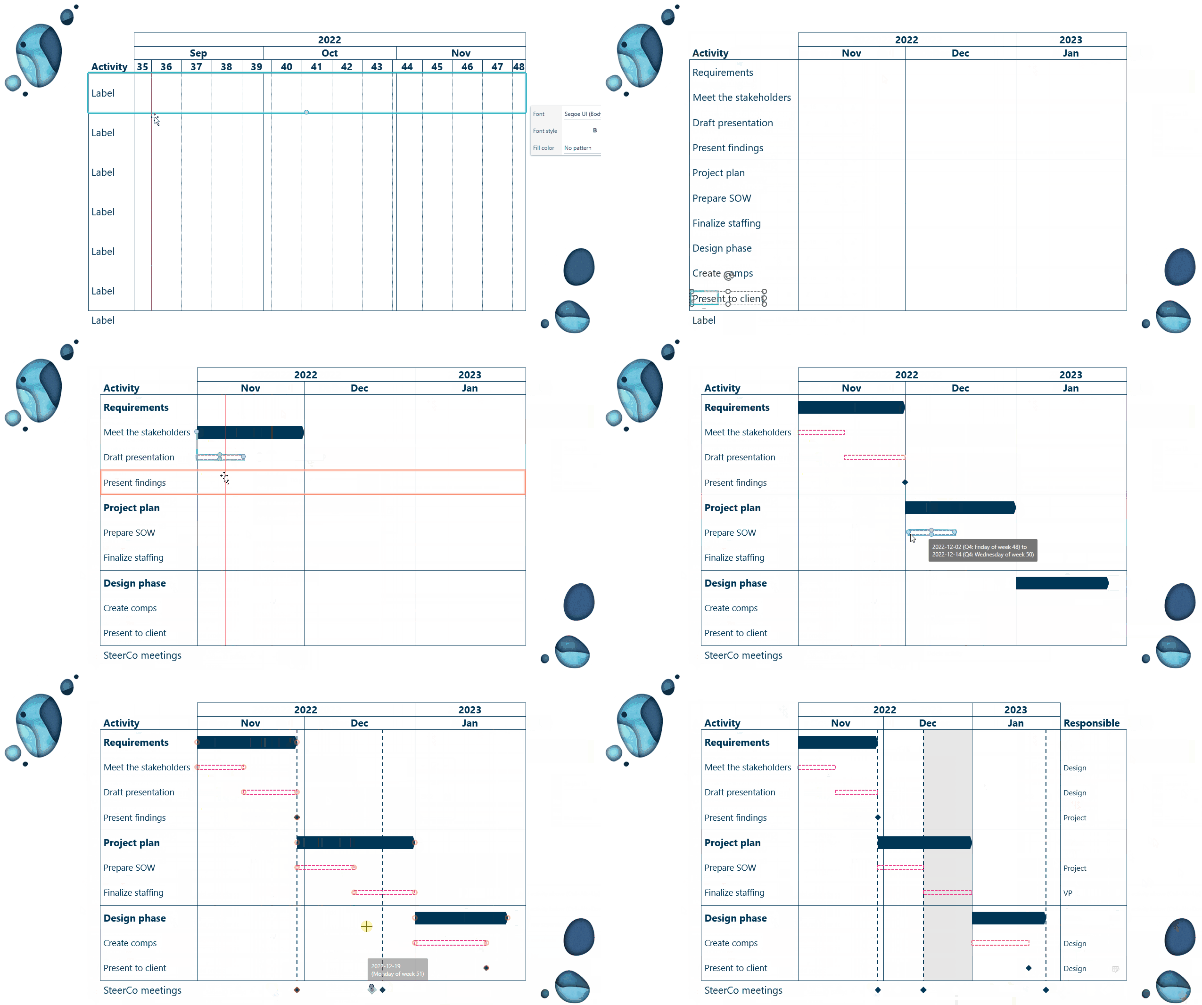
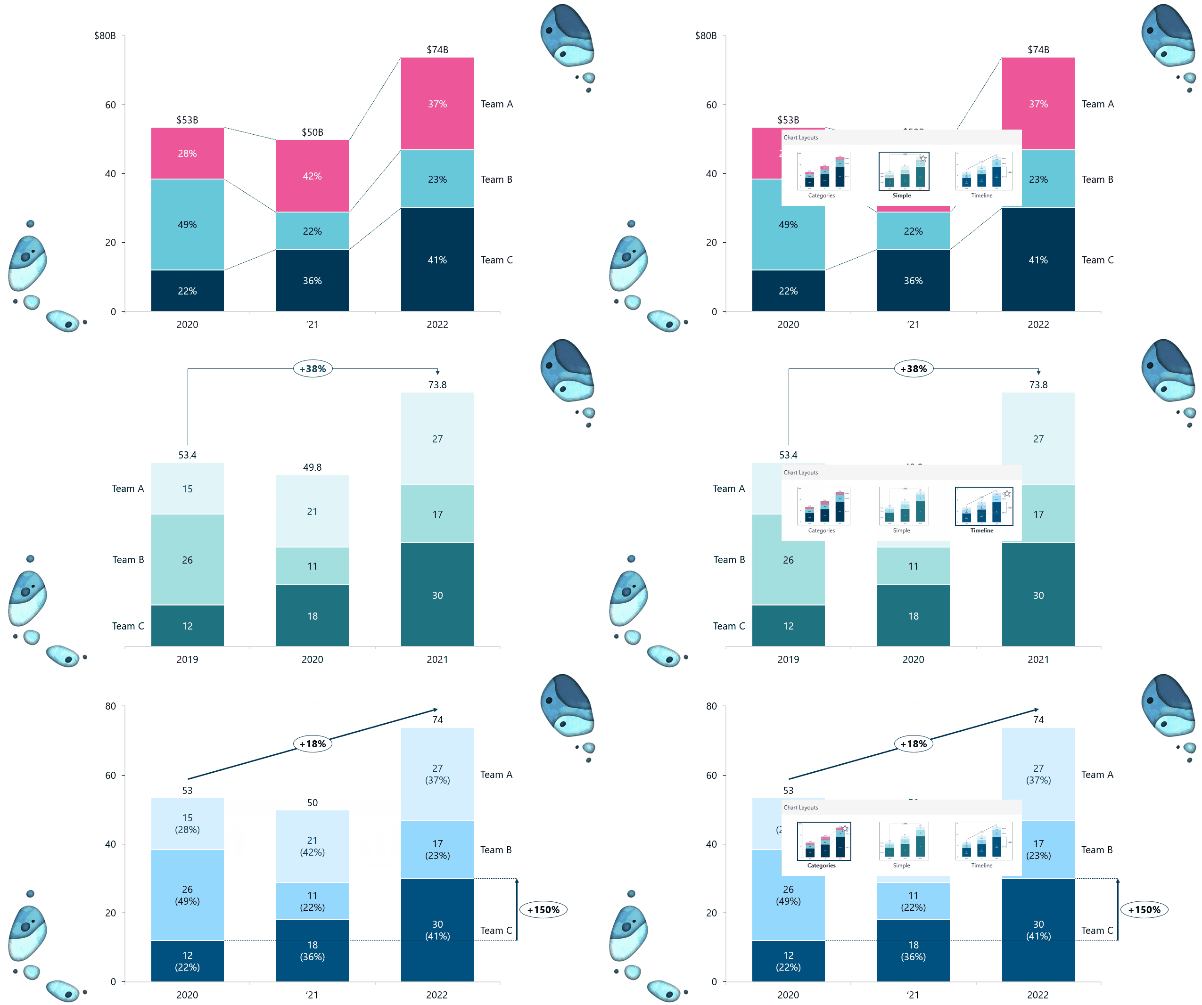
Ampler Charts builds charts PowerPoint cannot make natively and applies your style with one click.
More than native charts
Gantt, mekko, 100% mekko and waterfall charts without any workaround, straight in PowerPoint.
18 chart types
From stacked columns and bars to scatter, bubble, line, area, pie, doughnut and combination charts.
Instant formatting
Save a chart layout and apply your design to any chart with a single click.
Company identity
Company settings adapt the theme to your organization's brand, look and feel.
Chart conversion
Convert think-cell, Mekko Graphics and Excel charts into Ampler Charts, keeping them editable.
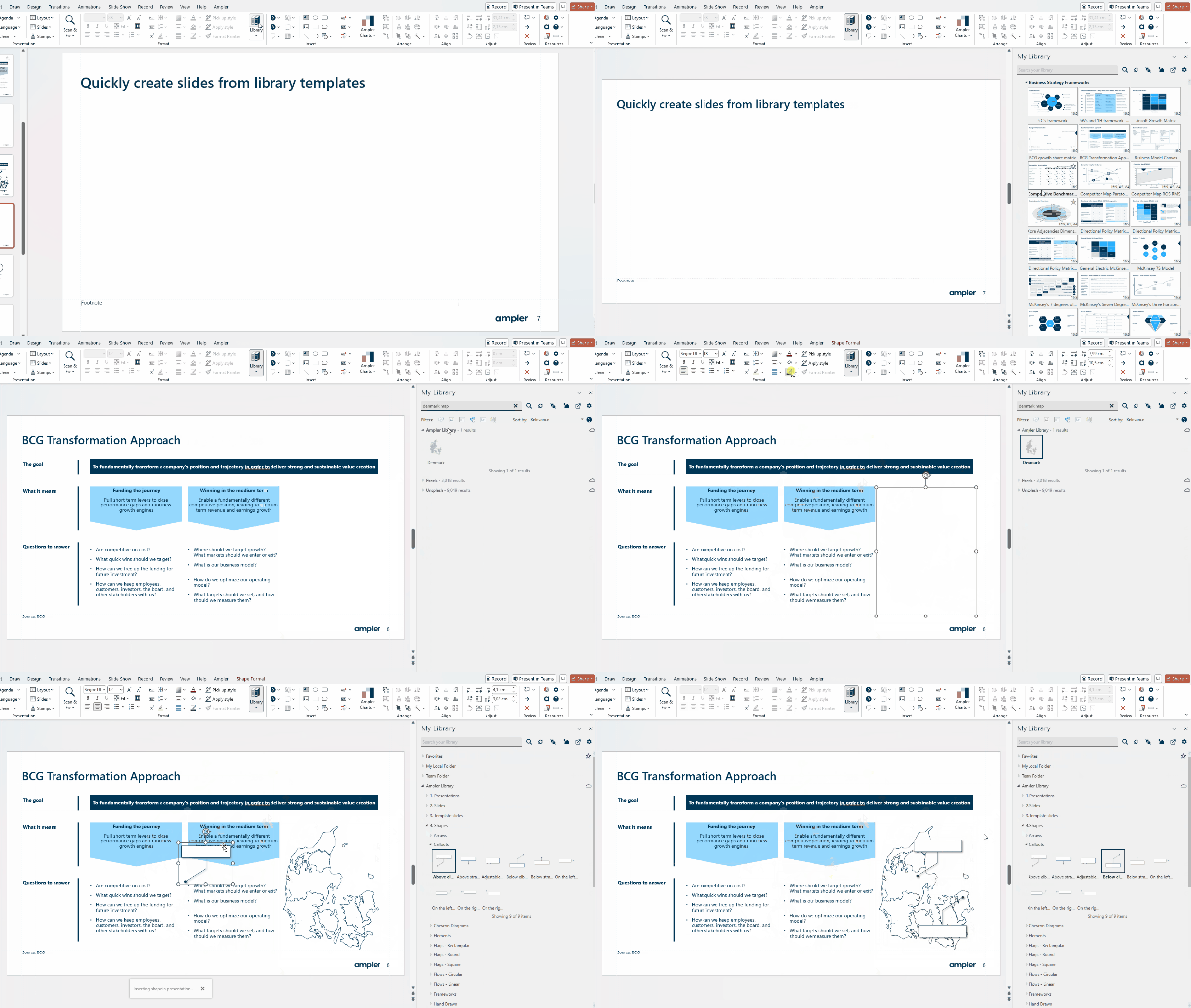
The Library puts all your company content inside Office, always up to date and on brand.
Content variety
Templates, presentations, slides, workbooks, documents, maps, icons and infographics.
Instant access
Personal, team and company content in embedded buttons, with Boards, metadata and advanced search.
Administration
Edit, update and organize content inside Office; linking propagates the change to everyone.
Dynamic content
Templates that adapt to language, aspect ratio and data coming from Active Directory.
IT integrations
Connects to SharePoint preserving access rights, and to the company's DAM systems.
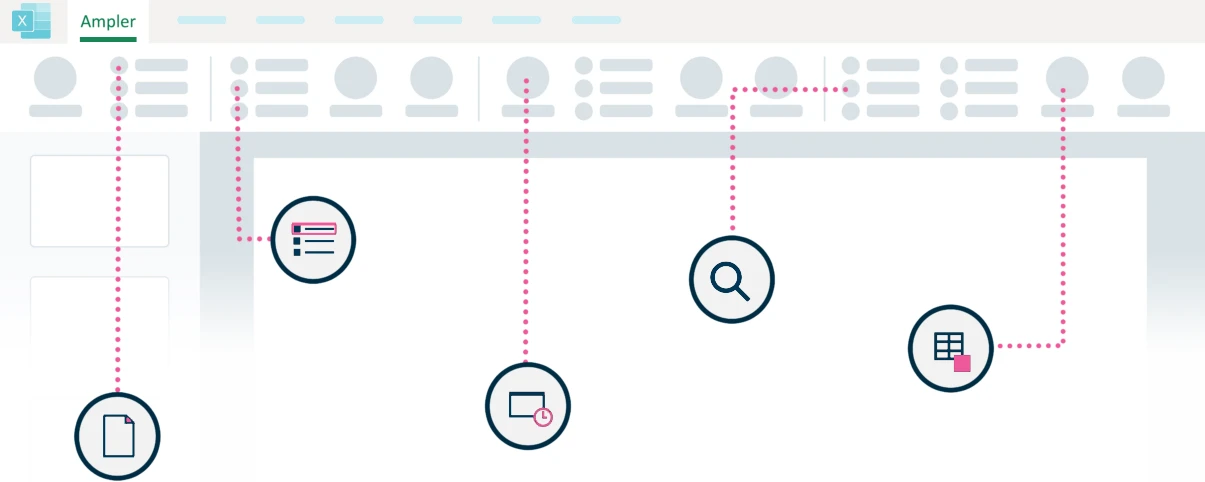
Ampler for Excel speeds up modelling and reduces the risk of error in complex workbooks.
Modelling at a click
Generate ready-to-use models and workbooks without building the structure from scratch.
Automatic index
An interactive, automatically updated index page for any workbook.
Immaculate formatting
Functions and shortcuts that standardize the look and reduce the risk of misreading the model.
Model understanding
Discover the structure and interconnections of any model, even one built by someone else.
Audit and transparency
Simplified formula checking and an automatic scan for the most common modelling errors.
Ampler for Word turns long documents into professional, consistent deliverables.
Advanced templates
Professional documents in one click, with no need to set up every element manually.
Building blocks
Assemble the document from customizable blocks that already follow the company standard.
Library content
Access all your company's ready content directly in Word, without digging through folders.
Unified Office
Insert PowerPoint illustrations and Excel tables that stay editable inside the document.
Professional editing
Automatically find and resolve document inconsistencies before delivery.
Ampler for Outlook standardizes signatures and removes repetition from everyday email.
Managed signatures
Edit, manage and distribute standardized signatures across the whole organization.
Dynamic signatures
Vary by period, geography, campaign or Active Directory fields. Compatible with the new Outlook, web and mobile.
Time savers
Four-week calendar, multiple time zones, attachment renaming, scheduled sending and subject prefixes.
Library in email
Company mail templates, text building blocks, icons, images and maps inside Outlook.
Filters and toolbar
Automatic categorization, search filters in the toolbar and a toolbar built the way your team works.
Ampler builds on the infrastructure your company already has, without creating another content silo.
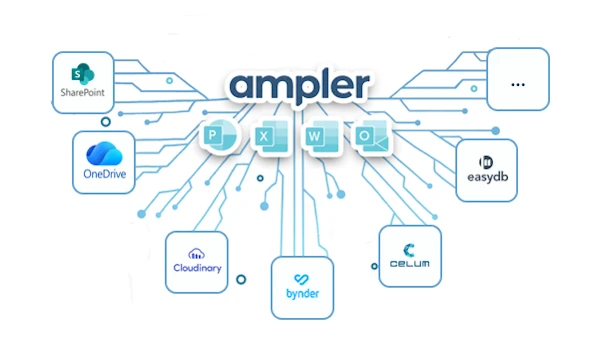
SharePoint and OneDrive
Content served from your current repositories, preserving the access rights already configured.
DAM systems
Integration with digital asset management platforms to bring brand material into Office.
Active Directory
AD fields automatically feed signatures, covers and dynamic templates.
Enterprise deployment
Centralized distribution of add-ins and settings to every workstation.
Brand governance
Central administration defines what each team sees and uses — the brand stays consistent by design.
Your company library, inside Office
The Ampler Library is the single repository of approved content — and it lives inside PowerPoint, Excel, Word and Outlook.
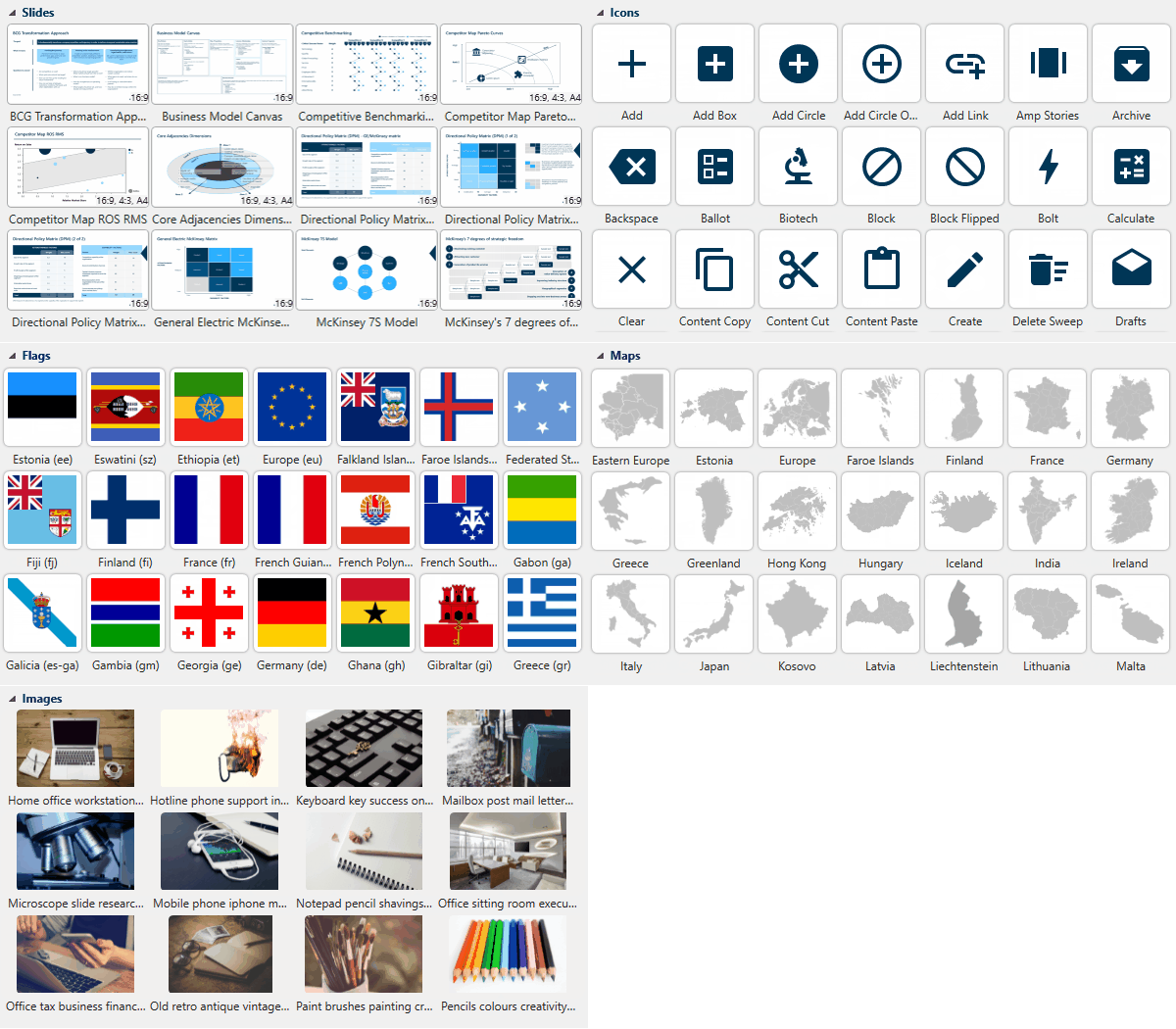
Every type of content
Templates, presentations, whole slides, workbooks, documents, maps, icons and infographics gathered in one place.
Finding is instant
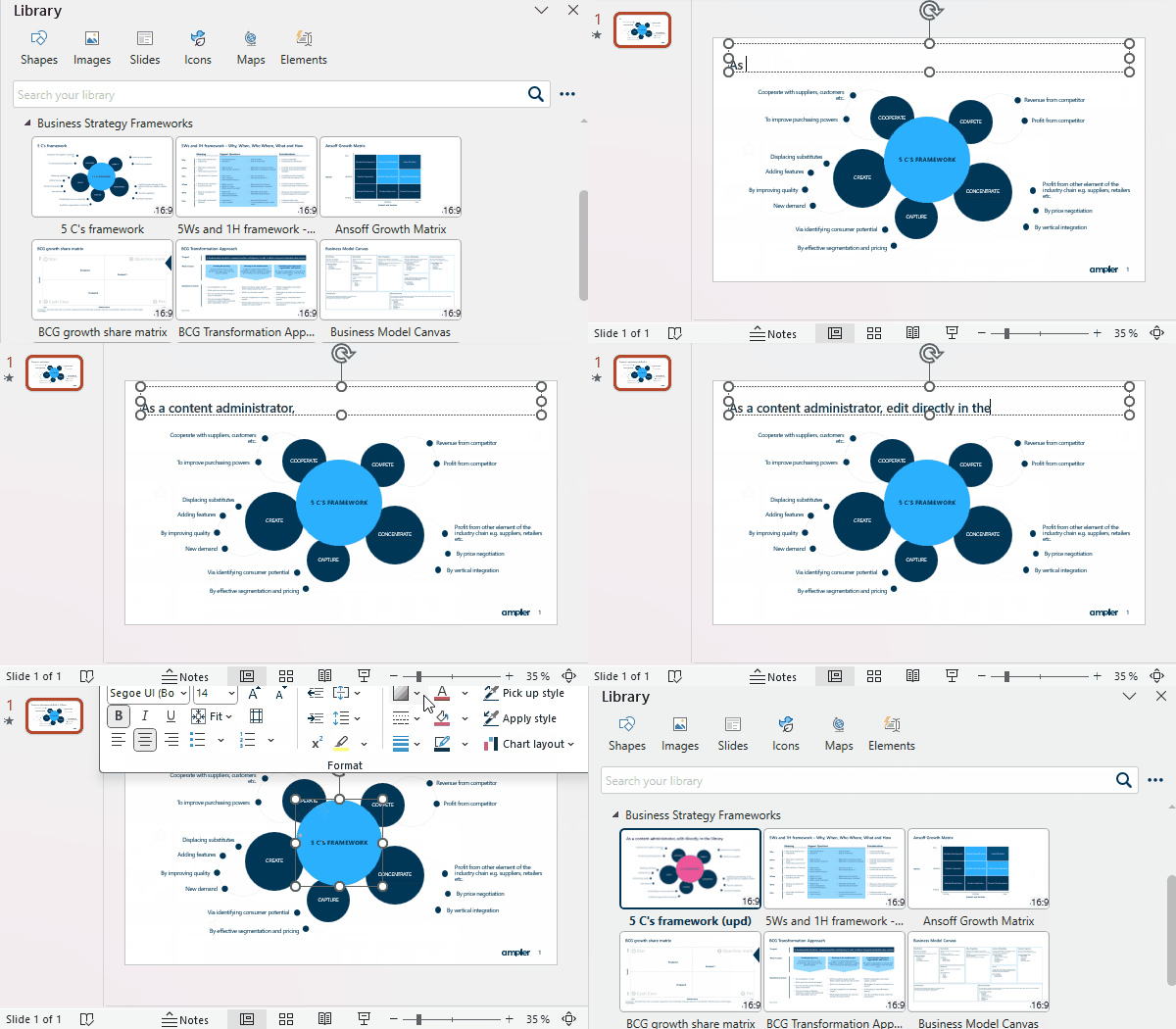
Boards for filtering, metadata and advanced search put the right content a few clicks away, without leaving the Office app.
Centralized administration
Edit and update content inside Office itself; linking propagates the new version to every team immediately.
Requirements and Compatibility
Installs as a native add-in in Microsoft Office applications for Windows:
Supported systems and deployment:
- System: Windows 10 or later, with Microsoft .NET Framework 4.5 or newer installed.
- Office: PowerPoint, Excel, Word and Outlook (Office 2007 to 2024 or Microsoft 365), with an internet connection for the Library and updates.
The complete suite for Microsoft Office
With one click, Ampler builds the presentation, workbook or document from your company's official templates — slide master, cover, header and footer already correct.
Storyboard organizes your line of reasoning before you draw the first slide, and the Agenda is created and updated on its own throughout the presentation.
Ampler Charts delivers charts PowerPoint cannot build natively — Gantt, mekko and waterfall, among 18 types — with your brand formatting applied in a single click.
And Scan & Fix sweeps the file before delivery, correcting misalignments, off-brand fonts and formatting inconsistencies: zero-defect material, on time.
Flawless formatting, no manual rework
Aligning boxes, evening out spacing and checking fonts eats hours in any presentation. Ampler solves that with alignment, distribution and instant formatting shortcuts applied to any slide element.
Scan & Fix runs the final review: it automatically finds and corrects font, color, size and positioning inconsistencies — including in files that came from outside the company.
All your company content, inside Office
The embedded Library puts templates, presentations, slides, workbooks, documents, maps, icons and infographics one click away, with Boards for filtering, metadata and advanced search.
The library connects to SharePoint, OneDrive, Google Drive and DAM systems, respecting the access rights that already exist in your infrastructure — without creating yet another content silo.

How Ampler is licensed
From the charting add-in to the full suite, licensing follows the size and usage profile of your team.
Ampler Charts
- Stand-alone charting add-in for PowerPoint
- Gantt, mekko, waterfall and 15 more chart types
- Chart formatting applied in a single click
- Converts think-cell, Mekko Graphics and Excel charts
Ampler for one app
- Full functionality in a single application of your choice
- Available for PowerPoint, Excel or Word
- Includes the embedded Library and Scan & Fix
- Ideal for teams with one clearly defined focus
Ampler Suite
- Full functionality in PowerPoint, Excel, Word and Outlook
- A single Library shared across every application
- Ampler Charts and Outlook signatures included
- The most common option for teams producing material all day
Ampler Enterprise
- Special terms for large user volumes
- Centralized add-in deployment by IT
- Integrations with SharePoint, DAM and Active Directory
- Brand governance and central content administration
The plans above reflect the editions published by the manufacturer. OSB Software builds the proposal with localized licensing and invoicing in Brazil — pricing on request.
Who gains the most time with Ampler
Teams that live on well-crafted material — presentations, models and documents — in virtually any industry.
Consulting
Client decks with flawless structure, charts and visual standard, on tight deadlines.
Finance and M&A
Auditable Excel models and deal materials with no formatting errors.
Marketing and Brand
Approved content always at hand and brand identity respected across the company.
Manufacturing
Standardized operations reports, results presentations and technical documentation.
Executives and Board
Board and results material built from the official templates.
PMO and Projects
Gantt schedules straight in PowerPoint and status reports always in the same format.
Legal and Compliance
Long Word documents with standardized building blocks and automatic review.
Information Technology
Centralized deployment, SharePoint integration and content governance.
Education and Training
Consistent training material, created and updated from a single library.
Frequently Asked Questions about Ampler
How much does Ampler cost?
OSB Software prepares personalized proposals for Ampler based on the number of licenses, the chosen edition (Charts, single app, Suite or Enterprise) and your team's needs. Licensing is localized, with invoicing in Brazil. Request a proposal through the form or talk to Sofia.
What is Ampler?
Ampler is an enterprise productivity solution that integrates with Microsoft Office through native add-ins. It adds a tab with advanced features to PowerPoint, Excel, Word and Outlook, letting teams build material faster, with visual consistency and organizational control.
Which Office applications does Ampler support?
PowerPoint, Excel, Word and Outlook. There is also Ampler Charts, a stand-alone charting add-in for PowerPoint. You can license a single application or the full suite, depending on how your team works.
Does Ampler work with Microsoft 365 and the new Outlook?
Yes. Ampler is compatible with Microsoft 365 and with Office versions installed on Windows. Email signatures work in every version of Outlook, including the new Outlook, Outlook on the web and mobile.
What does Ampler Charts do that PowerPoint cannot?
Ampler Charts creates chart types that do not exist natively in PowerPoint, such as Gantt, mekko, 100% mekko and waterfall, across 18 types in total. It also saves chart layouts so you can apply the company design in one click, and converts think-cell, Mekko Graphics and Excel charts into Ampler Charts while keeping them client-side editable.
How does the Ampler Library work?
The Library is embedded in the Office applications and gathers templates, presentations, slides, workbooks, documents, maps, icons and infographics. Content is organized in Boards, with metadata and advanced search, and can be edited inside Office itself — linking propagates the new version to every team.
Does Ampler integrate with SharePoint and DAM systems?
Yes. The Library connects to SharePoint preserving the access rights already configured, and integrates with digital asset management (DAM) systems as well as repositories such as OneDrive and Google Drive. Company content becomes available in Office without duplicating files.
What is Scan & Fix?
It is Ampler's automatic review. It sweeps the file before delivery and corrects inconsistencies and formatting problems — misalignments, wrong fonts, spacing and off-brand colors — including in material received from outside the company.
Is there an Ampler trial?
Yes. The manufacturer offers a free 30-day trial with full functionality. OSB Software advises on the best way to run that evaluation with your real scenario and helps define which edition makes sense before purchase.
What are Ampler's requirements?
Windows 10 or later, Microsoft Office 2007 to 2024 or Microsoft 365, Microsoft .NET Framework 4.5 or later and an internet connection for the Library and updates.
How is Ampler deployed in a large company?
Add-ins and settings can be distributed centrally by the IT team to every workstation, with no individual installation. Central administration defines templates, content and permissions per team, and Active Directory fields can feed signatures and dynamic templates.
What are Ampler's licensing models?
There is Ampler Charts (charting only, for PowerPoint), plans for a specific application (PowerPoint, Excel or Word), the Suite plan covering every application, and the Enterprise plan with special terms for large user volumes.
How can I buy Ampler in Brazil?
OSB Software supplies the Ampler license in Brazil with localized licensing and invoicing in reais. The process starts with a qualification conversation, follows with a commercial proposal, and delivery happens after the contract is signed.
What type of invoice does OSB issue for Ampler?
OSB issues an NFS-e (Brazilian electronic service invoice) due to tax requirements arising from the STF decision that classified software operations under ISS. The legal nature of the operation is the supply of a software license, even though the fiscal document issued is a service invoice.
Why buy Ampler from
OSB Software?
OSB Software is a reference in technology solutions, working directly with manufacturers to guarantee 100% genuine licenses, special terms and full compliance for your business.
- Consultative, specialized service from professionals who understand your needs.
- Fast, secure processes, from payment to license delivery.
- Dedicated commercial follow-up, from proposal to license delivery and renewal.
- Localized licensing and flexible invoicing, with terms that adapt to your operating model.
- Proven credibility, with thousands of customers served across Brazil.
Choose OSB Software to acquire Ampler and get reliable technology, qualified service and a simple, transparent, hassle-free purchase.
Contact Us