
SonarQubeClean, secure, production-ready code — on every commit
With SonarQube, your teams ship clean, secure and maintainable code from the very first commit: static analysis for 30+ languages, vulnerability detection and a Quality Gate that keeps problems out of production. OSB Software handles licensing, local invoicing and commercial follow-up in Brazil.
What is SonarQube?
SonarQube is Sonar's code quality and security platform. It automatically analyzes the source code in your repositories looking for bugs, vulnerabilities, security hotspots and maintainability issues, turning every analysis into an objective list of fixes — with an explanation, code examples and the exact location of the problem.
It is available as SonarQube Server (installed on your own infrastructure), SonarQube Cloud (SaaS) and SonarQube IDE (a free extension for VS Code, IntelliJ, Visual Studio and Eclipse), following the code from the editor to the CI/CD pipeline. OSB Software helps you size the right edition and lines-of-code volume for your operation.
Quality and security measured, not estimated
The indicators SonarQube hands back to the team on every analysis.
Clean as You Code: quality without a refactoring task force
The path every commit travels before reaching production:
Write
SonarQube IDE flags issues inside the editor, while the code is still being written — before the commit.
Analyze
On every push, the scanner runs in the CI/CD pipeline and evaluates bugs, vulnerabilities, test coverage and duplication.
Review
The result is published on the pull request itself, commented on GitHub, GitLab, Bitbucket or Azure DevOps.
Quality Gate
If the new code does not meet the criteria, the gate fails and the merge is blocked. If it does, the flow moves on without friction.
Ship
Code reaches production clean, and the project history shows quality improving release after release.
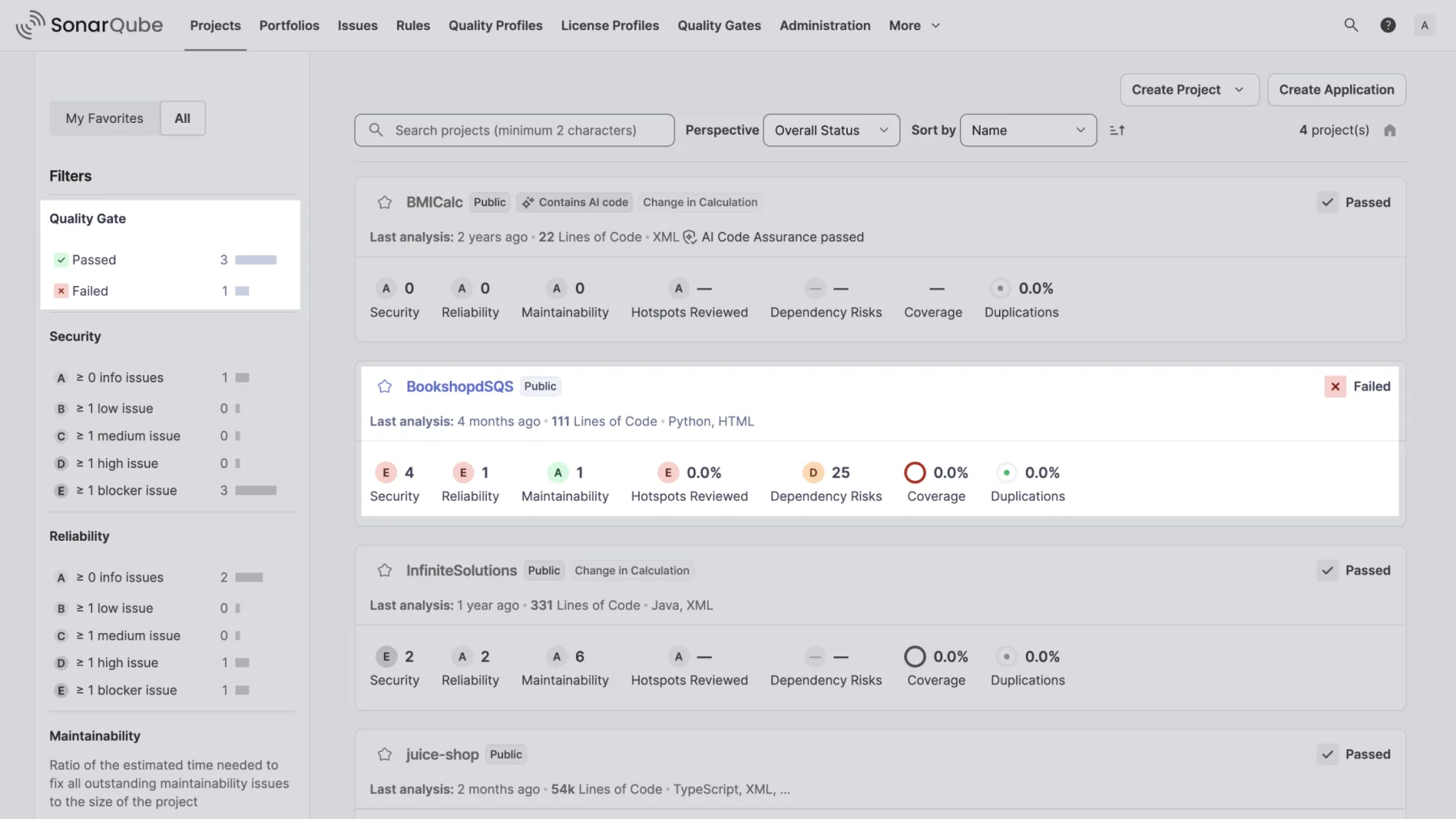
The dashboard your team will open every day
Every project, the Quality Gate status and each metric rating on a single screen — with severity filters so the team tackles what matters first.
- Passed/Failed Quality Gate status project by project
- Filters by security, reliability and maintainability
- Flagging of projects that contain AI-generated code
- Last analysis, languages and codebase size in lines of code
SonarQube for every front of your engineering team
SonarQube static analysis turns perception into numbers: bugs, code smells and technical debt stop being an opinion in code review and become objective criteria.
Continuous Static Analysis
Every push is analyzed automatically, without relying on someone remembering to run the check.
Explained Rules
Every issue brings the why, compliant and non-compliant code examples and a link to the rule applied.
Estimated Technical Debt
Fix effort is converted into time, which allows prioritizing refactoring with concrete data.
Coverage and Duplication
Import test coverage reports and track duplicated blocks that make every maintenance more expensive.
SonarQube works as SAST built into the development flow, finding vulnerabilities while the code is still cheap to fix.
Vulnerability Detection
SQL injection, XSS, insecure deserialization and other flaws identified straight in the source code.
Taint Analysis
Traces the path of untrusted data from the entry point to the sensitive sink, exposing the root cause of the flaw.
Security Hotspots
Sensitive snippets are separated for human review, avoiding false alarms treated as vulnerabilities.
Industry Standards
Rules mapped to OWASP Top 10, CWE Top 25 and PCI DSS, making evidence for audits easier.
AI assistants increased the volume of code — and the volume of review. SonarQube applies the same standard to what AI writes and to what the team writes.
One Standard for All Code
AI-suggested code goes through the same quality and security rules as the rest of the project.
Projects With AI Code
Identify which projects contain AI-generated code and track the quality assurance of those codebases.
Assisted Fixes
Fix suggestions speed up issue resolution without taking the final decision away from the developer.
Review That Scales
The automated gate holds what manual review can no longer keep up with at the current delivery pace.
SonarQube fits into the flow the team already uses — from the editor to the pipeline — with no process change required.
Pull Request Decoration
GitHub, GitLab, Bitbucket and Azure DevOps receive the analysis result inside the PR itself.
CI/CD Pipelines
Jenkins, GitHub Actions, GitLab CI, Azure Pipelines and others, via scanners for Maven, Gradle, .NET and CLI.
SonarQube IDE
Free extension for VS Code, IntelliJ, Visual Studio and Eclipse, with the same rules as the server.
Branch Analysis
Feature branches analyzed separately, with the Quality Gate applied only to the new code.
Which SonarQube edition fits your team?
Commercial editions are licensed by the volume of lines of code analyzed. Our team helps you estimate it before the proposal.
Community Build
An open source starting point for small teams.
- Popular languages such as Java, JavaScript/TypeScript, Python, C#, PHP, Go and Kotlin
- Rules for bugs, code smells and vulnerabilities
- Main branch analysis
- Installed on your own infrastructure
Developer Edition
For teams working with pull requests that need SAST.
- Everything in Community Build
- Branch analysis and pull request decoration
- Taint analysis for SQL injection, XSS and similar flaws
- Additional languages such as C, C++, Objective-C, Swift, PL/SQL, T-SQL and ABAP
Enterprise Edition
For operations with many teams that need an executive view.
- Everything in Developer Edition
- Portfolios and Applications with an aggregated view
- Executive PDF reports
- Parallel project analysis and centralized policies
Data Center Edition
For operations that cannot stop.
- Everything in Enterprise Edition
- Clustered architecture with high availability
- Horizontal scalability for large volumes
- Resilience to component failures
Also available as SonarQube Cloud (SaaS, no infrastructure to maintain) and SonarQube IDE, the free extension that brings the same rules to VS Code, IntelliJ, Visual Studio and Eclipse.
Requirements and Compatibility
Requirements for SonarQube Server (self-hosted) — with SonarQube Cloud there is no environment to provision:
Supported integrations and environments:
- Repositories: GitHub, GitLab, Bitbucket (Cloud and Data Center) and Azure DevOps.
- CI/CD: Jenkins, GitHub Actions, GitLab CI, Azure Pipelines, Bitbucket Pipelines and others via the command line scanner.
- IDEs with SonarQube IDE: Visual Studio Code, IntelliJ IDEA (and other JetBrains IDEs), Visual Studio and Eclipse.
Stop inheriting technical debt: fix it before the merge
The Clean as You Code methodology focuses attention on new or changed code. Instead of requiring a task force to fix years of legacy, the team keeps the standard on what it writes today — and the codebase improves on its own with every release.
The Quality Gate works as the team's quality contract: if new code does not meet the defined criteria (vulnerabilities, test coverage, duplication, reviewed hotspots), the pull request fails automatically and the pipeline stops.
Every issue comes with a clear explanation, compliant and non-compliant code examples and a link to the rule applied — developers learn while they fix, without relying on manual review to catch the basics.
With pull request decoration on GitHub, GitLab, Bitbucket and Azure DevOps, the analysis result shows up inside the review flow itself, with no need for the team to switch tools.
Application security (SAST) inside the development flow
SonarQube identifies vulnerabilities and security hotspots with static analysis and taint analysis, tracing the path of untrusted data from the entry point to the sensitive part of the code — the real source of SQL injection, XSS and similar flaws.
Rules are mapped to widely recognized standards such as OWASP Top 10, CWE Top 25 and PCI DSS, which makes it easier to evidence compliance in internal audits and in vendor assessments with corporate customers.
Governance for teams with dozens (or hundreds) of repositories
Portfolios and Applications consolidate the health of many projects into a single view, with historical evolution — the reading engineering leaders need to prioritize technical investment with data instead of perception.
In the Enterprise and Data Center editions, standardized quality policies, fine-grained permission management and a clustered architecture support operations with many teams, many lines of code and strict availability requirements.
Frequently Asked Questions about SonarQube
How much does SonarQube cost?
Commercial SonarQube editions are licensed by the volume of lines of code analyzed and by the chosen edition (Developer, Enterprise or Data Center). OSB Software prepares a personalized proposal after understanding the size of your codebase — request one through the form or talk to Sofia.
What is SonarQube?
SonarQube is Sonar's code quality and security platform. It automatically analyzes source code looking for bugs, vulnerabilities, security hotspots and maintainability issues, presenting the result on a dashboard with objective ratings and a list of fixes.
What is the difference between SonarQube Server, SonarQube Cloud and SonarQube IDE?
SonarQube Server is installed on your company's infrastructure, with full control over data and environment. SonarQube Cloud is the SaaS version, with no server to maintain. SonarQube IDE is the free extension that brings the rules into the editor (VS Code, IntelliJ, Visual Studio and Eclipse) — the three complement each other.
Is SonarQube free?
Community Build is free and open source, with main branch analysis and coverage of the most popular languages. Features such as branch analysis, pull request decoration, taint analysis, portfolios and high availability are in the commercial Developer, Enterprise and Data Center editions.
What is the Quality Gate?
The Quality Gate is the set of criteria code must meet to be approved — for example, no new vulnerabilities, a minimum test coverage on new code and duplication below a threshold. When the code does not comply, the analysis fails and the merge can be blocked automatically.
What does "Clean as You Code" mean?
It is the methodology recommended by Sonar: instead of trying to fix all the legacy at once, the team applies the quality standard only to new or changed code. Over time, the share of clean code grows naturally, with no paralyzing refactoring projects.
Which languages does SonarQube analyze?
More than 30 languages and technologies, including Java, C#, JavaScript, TypeScript, Python, Go, PHP, Kotlin, Ruby, Scala, HTML and CSS. Commercial editions add languages such as C, C++, Objective-C, Swift, PL/SQL, T-SQL and ABAP, plus infrastructure files such as Terraform, Docker and Kubernetes.
Does SonarQube replace code review?
No — it removes the mechanical part of the review. Bugs, security flaws, duplication and writing standards are checked automatically, freeing the human reviewer to discuss architecture, business rules and readability.
Does SonarQube find security vulnerabilities?
Yes. It works as a SAST tool, identifying vulnerabilities and security hotspots in the source code. Taint analysis, available from the Developer Edition, traces the path of untrusted data to the sensitive sink, revealing the root cause of SQL injection, XSS and similar flaws.
Does SonarQube analyze AI-generated code?
Yes. Code suggested by AI assistants goes through exactly the same quality and security rules as code written by the team, and the dashboard lets you identify which projects contain AI-generated code so those codebases can be tracked closely.
How does SonarQube integrate with my CI/CD pipeline?
Through scanners for Maven, Gradle, .NET, Ant, npm and the command line, with integrations for Jenkins, GitHub Actions, GitLab CI, Azure Pipelines and Bitbucket Pipelines. The analysis result can be published directly on the pull request in GitHub, GitLab, Bitbucket or Azure DevOps.
What are the requirements to install SonarQube Server?
It requires Java 17 (JRE or JDK) and a PostgreSQL, Microsoft SQL Server or Oracle database — MySQL is not supported. Installation can be done on Linux or Windows, with official Docker and Kubernetes images, and the bundled Elasticsearch requires a few kernel settings on the host.
How can I buy SonarQube in Brazil?
OSB Software handles SonarQube licensing with local invoicing and commercial follow-up in Brazil. Fill out the form on this page or talk to Sofia to receive a proposal sized for your codebase.
What type of invoice does OSB issue for SonarQube?
OSB issues an NFS-e (Brazilian electronic service invoice) due to tax requirements arising from the STF decision that classified software operations under ISS. The legal nature of the operation is the supply of a software license, even though the fiscal document issued is a service invoice.
Why buy SonarQube from
OSB Software?
OSB Software is a reference in technology solutions, working in direct partnership with leading manufacturers to guarantee 100% genuine licenses, security and full compliance for your business.
- Consultative, specialized service from professionals who understand your needs.
- Fast, secure processes, from payment to license delivery.
- Dedicated commercial follow-up, from proposal to license delivery and renewal.
- Flexible invoicing, with terms that adapt to your operating model.
- Proven credibility, with thousands of customers served across Brazil.
Choose OSB Software to acquire SonarQube and get reliable technology, qualified service and a simple, transparent, hassle-free buying experience.
Contact Us