
iSpring Suite
iSpring Suite is a fully authoritative toolkit for PowerPoint E-Learning.
iSpring Suite is a fully authoritative toolkit for PowerPoint E-Learning.
Introducing the iSpring Suite, the best platform for creating online courses. With iSpring Suite, you can easily create interactive slide courses, pages with audiovisual resources and video instructions, intelligent quizzes and role-play simulations. Furthermore, this tool allows you to create personalized e-learning interactions to increase student engagement and make learning more fun.
One of the main advantages of iSpring Suite is its ease of use. Even without any specific training, you can create professional and effective courses with just a few clicks. iSpring Suite is fully integrated with PowerPoint, which means you can use all of its functionality and features to create quality content.
iSpring Suite also offers advanced features such as the ability to create role-play simulations where students can practice their skills in simulated situations. In addition, you can create intelligent quizzes with adaptive questions that adjust the difficulty level according to student performance. These features make learning more interactive and personalized, increasing information retention and student satisfaction.
Another highlight of iSpring Suite is its ability to create responsive courses that automatically adjust to the size of the student's device screen. This means your courses can be accessed on any device, from desktops to tablets and smartphones.
In short, iSpring Suite is the perfect tool for creating professional and effective online courses. With its advanced features and ease of use, you can create interactive and personalized courses in minutes. Try iSpring Suite now and discover how easy and fun creating online courses can be.
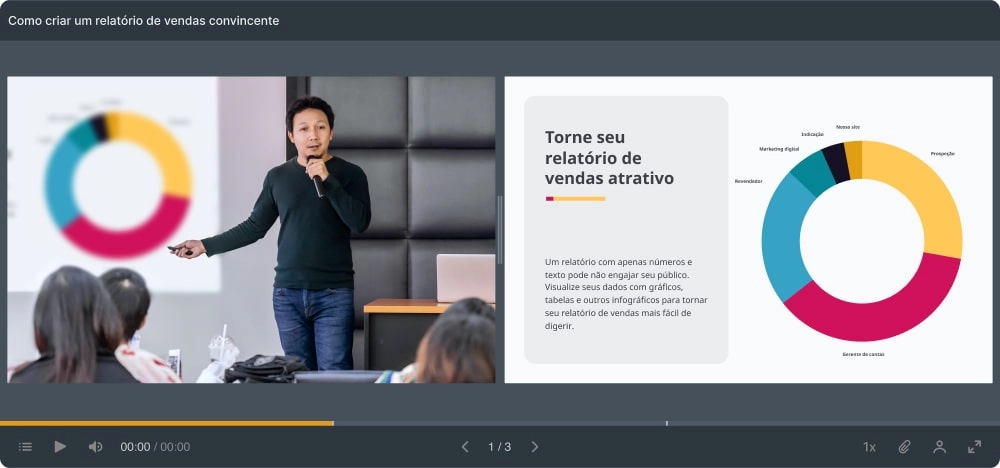
If you are looking for an efficient and practical way to create interactive and dynamic online courses, the iSpring Suite is a complete solution to meet your needs. With various functionalities, you can convert presentations to SCORM, create video lectures, e-learning interactions, interactive assessments, video editor, screen recordings, interactive simulations, text-to-speech, content library, adaptive player, tool online collaboration capabilities and compatibility with your LMS.
Conversion of PPT to SCORM
Turn your PowerPoint presentations into responsive, mobile-friendly online courses using the iSpring Suite PPT to SCORM Converter.
Video lectures
Mix your videos with slides to create more dynamic and engaging courses with iSpring Suite's video lectures function.
E-learning interactions

Delight your students with 14 interactive templates available in the iSpring Suite. Present content in an engaging way and make learning more effective.
Interactive assessments
Create quizzes with 14 question templates, branching structure and scoring rules in iSpring Suite. Keep your students engaged and increase knowledge retention.
Video editor
Edit and customize your videos with iSpring Suite's video editor. Add titles, transitions, music and graphic effects to create professional looking courses.
Screen recordings
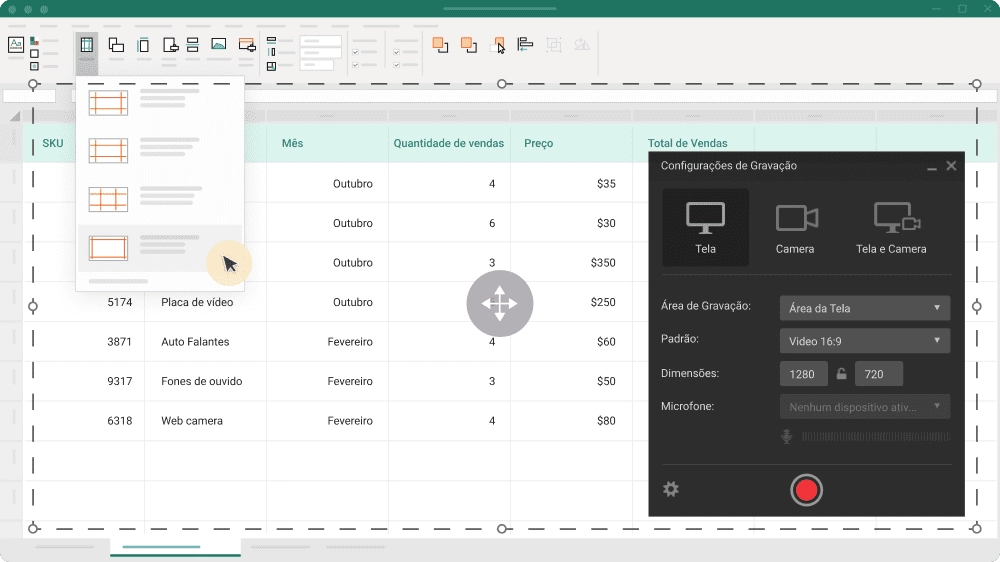
Capture your screens with iSpring Suite's screen recorder. Quickly record screencasts with voiceovers or webcam video to create more dynamic and effective lessons.
Interactive simulations

Create scenario-based conversations with iSpring Suite and boost your students' communication skills with interactive simulations.
Text to speech conversion
Turn text into professional voiceovers in up to 42 languages with iSpring Suite. Make your classes more accessible and effective for students of different languages.
Content Library
Use thousands of ready-made templates and images to create courses in just a few clicks in iSpring Suite. Save time and effort with the built-in content library.
Adaptive player
Courses created in iSpring Suite work seamlessly on all devices thanks to the adaptive player. Ensure the best experience for your students anywhere.
Online collaboration tool
Share content and receive real-time feedback with iSpring Suite's online collaboration tool. Collaborate with your team to create amazing online courses.
Compatibility with your LMS
Courses created with iSpring Suite are compatible with leading LMSs on the market, including SCORM/AICC/xAPI/cmi5. Share your courses on different platforms with ease.
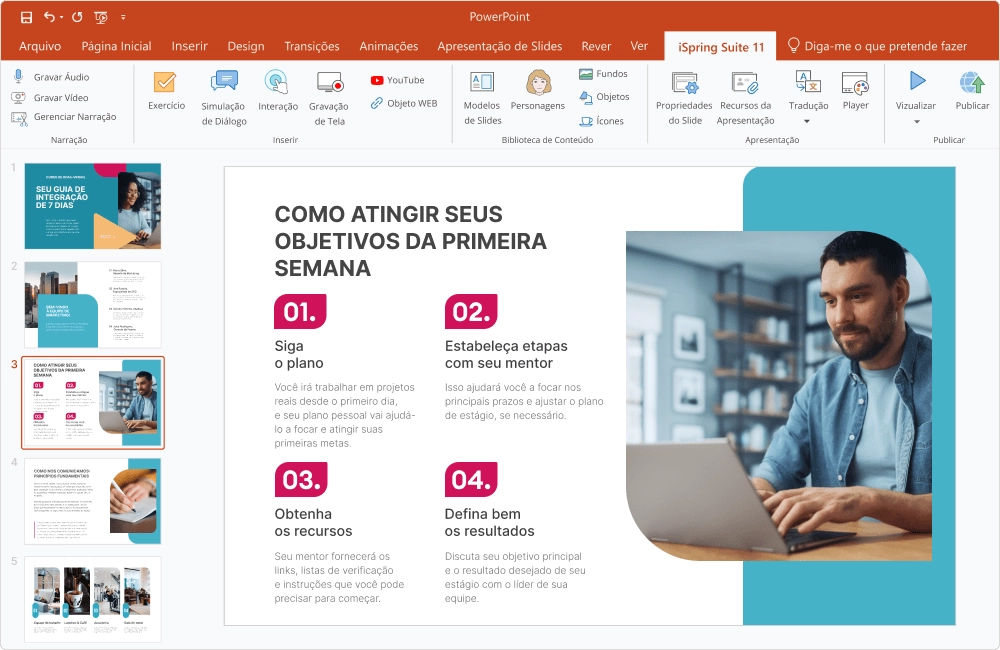
PowerPoint is a presentation software that is widely used by professionals from different industries across the world. However, not everyone knows that PowerPoint can be used to create high quality eLearning courses. With the help of iSpring Suite, a PowerPoint add-on, creating e-Learning courses has never been easier.
iSpring Suite is a powerful tool that helps users create interactive and engaging eLearning courses based on PowerPoint presentations. This means that users can use all existing content, images and graphics in their presentations and easily transform them into interactive and responsive online courses. With iSpring Suite, the user can add e-Learning elements such as simulations, quizzes, interactions, and much more to make learning more engaging.
Seamless integration with PowerPoint is one of the main advantages of iSpring Suite. This means that the user can use all the functionality and features of PowerPoint to create quality content, as well as take advantage of the advanced features offered by the iSpring Suite to create interactive and personalized e-Learning courses.
In addition, the iSpring Suite offers advanced features that allow you to create adaptive quizzes and role-play simulations that help increase student engagement and information retention. iSpring Suite also lets you create responsive courses that automatically adjust to the size of a student's device screen, making courses accessible anywhere, anytime.
In summary, iSpring Suite is a powerful tool for creating eLearning courses based on PowerPoint presentations. With its seamless integration, advanced features and ease of use, iSpring Suite is the perfect solution for anyone looking to create professional and engaging eLearning courses.
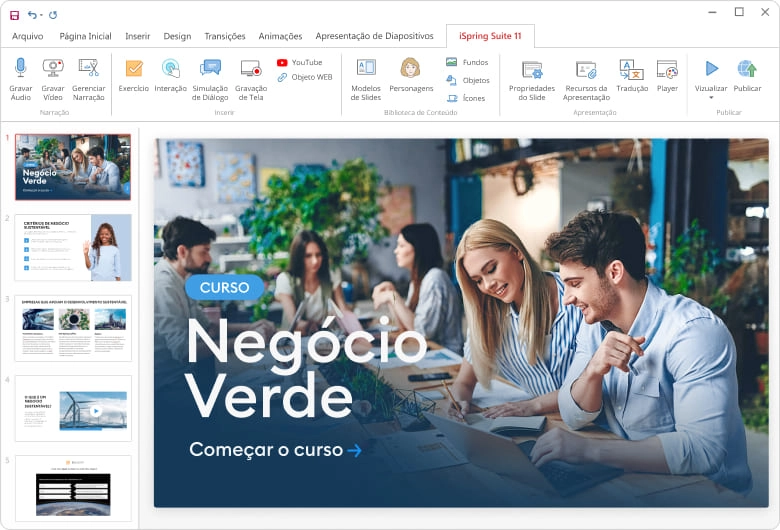
iSpring Suite is the most powerful toolkit for developing high-quality eLearning courses, seamlessly integrated into PowerPoint. With this solution, you can easily create interactive courses, video lessons, quizzes, tests, and quizzes, even without prior experience in e-Learning development.
By utilizing the iSpring Suite, users have access to advanced eLearning content creation features such as customizable templates, animated characters, transition effects, audio narration, simulations, eLearning interactions, and much more. And best of all, the iSpring Suite ensures courses work on any desktop, laptop or smartphone platform.
With iSpring Suite, you can quickly turn PowerPoint presentations into engaging, interactive eLearning courses. In addition, the solution offers advanced performance tracking and analysis capabilities, allowing users to assess student progress and identify areas for improvement in their eLearning courses.
If you are looking for a complete and easy-to-use solution for creating professional e-Learning courses, iSpring Suite is the right choice. Try it today and see how the iSpring Suite can transform your eLearning course creation experience.
iSpring Suite Max is an e-learning course design tool that offers advanced features to create attractive and personalized courses. With full PowerPoint compatibility, all transitions, hyperlinks, buttons, styles, SmartArt objects and 167 animations are kept intact, resulting in an original PPT presentation.
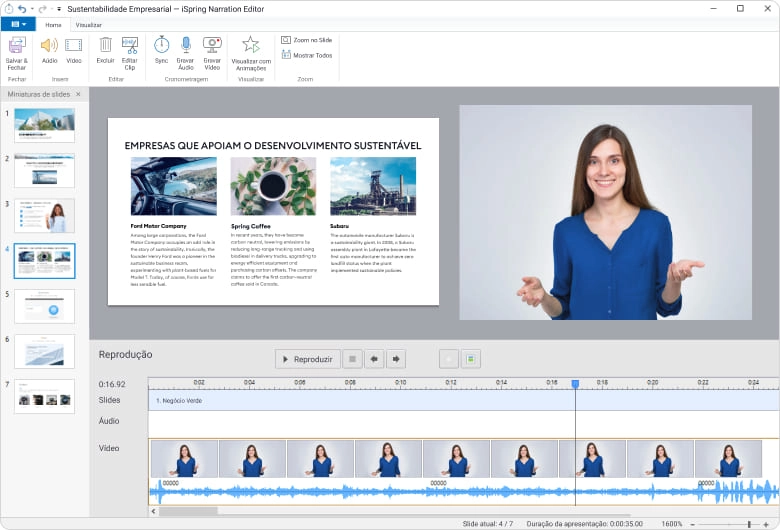
The narration editor allows you to record audio or video narrations and synchronize them with the slides, with the ability to cut unnecessary fragments, remove noise and adjust the volume. iSpring Suite Max also offers over 2,300 ready-made templates that you can select from to quickly build your course, with colors that you can adjust to match your branding.
To make your course even more engaging, iSpring Suite Max offers over 81,000 photos of characters from different ages, ethnic groups and professions, each with an amazing range of emotions, facial expressions and poses to match your course setting.
In addition, iSpring Suite Max includes 2,520 high-quality realistic locations such as offices, hospitals, banks, classrooms, stores, as well as realistic objects such as stationery, devices and interior objects. And with over 3,500 icons and buttons, you can ensure your content looks neat and polished.
In short, iSpring Suite Max offers advanced design features to create engaging and personalized e-learning courses. With full PowerPoint compatibility, ready-made templates, character photos, realistic locations, icons and buttons, you can easily create engaging courses that captivate your students.
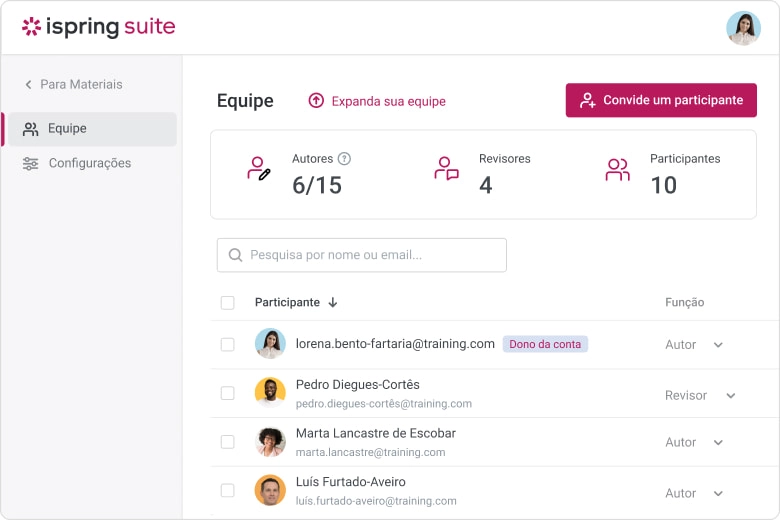
iSpring Space is an online course creation platform that enables team collaboration. By using the tool, it is possible to create courses in microlearning format and publish them in SCORM or xAPI format for the LMS.
Creating the course is simple and fast, just type the texts, add images and videos and create knowledge checks. In addition, it is possible to send the project to other team members and allow them to edit and improve the content, making the process more agile and efficient.
The platform also offers a facility in the course approval process. It is no longer necessary to submit physical copies of the course for approval. With iSpring Space, you can send a link for interested parties to view the course in a browser and leave their comments and suggestions.
With all these features, iSpring Space becomes an essential tool for those who want to create online courses in a collaborative, agile and efficient way.
iSpring Space is an online course creation platform that enables team collaboration. By using the tool, it is possible to create courses in microlearning format and publish them in SCORM or xAPI format for the LMS.
Creating the course is simple and fast, just type the texts, add images and videos and create knowledge checks. In addition, it is possible to send the project to other team members and allow them to edit and improve the content, making the process more agile and efficient.
The platform also offers a facility in the course approval process. It is no longer necessary to submit physical copies of the course for approval. With iSpring Space, you can send a link for interested parties to view the course in a browser and leave their comments and suggestions.
With all these features, iSpring Space becomes an essential tool for those who want to create online courses in a collaborative, agile and efficient way.
Quizzes are a great way to gauge student knowledge, but the key to making them effective is asking the right questions. There are different types of questions you can use to make the survey more engaging and accurate.
One of the most interactive question types are drag and drop questions. These questions are great for testing a student's understanding of a specific topic. They require the student to drag and drop objects onto an image to answer a question. For example, it could be a question about the correct placement of products on a shelf.
Another way to enhance a survey is to add informational slides that contain additional information about the subject. These slides can include text, photos and videos, or even a full article. This helps contextualize the questions and provide additional information that students can use to answer more accurately.
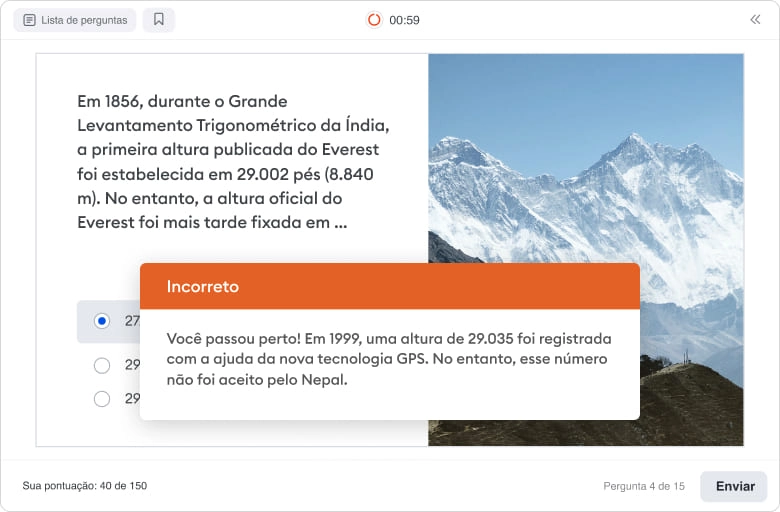
Quizzes can also include branches, which are scenarios created to customize the quiz. For example, if a student answers incorrectly, they can be sent to a slide with additional information to help them better understand the topic. If a student answers correctly, they can be moved on to a more challenging question.
Additionally, clustering and randomization can be used to make the quiz unique to each student. You can organize questions into groups and randomly select a series of questions from each group for each student. This helps prevent cheating and provides a more engaging and challenging quiz.
When creating a quiz, it's important to provide detailed feedback for correct and incorrect answers. You can use unified feedback messages for the entire test or create a specific feedback message for each question. Use pictures, formulas and audio to explain the answer in detail.
Finally, you can customize the design of your survey to make it more attractive. You can adjust fonts, layout, and color schemes for questions, and add images, shapes, and text labels, just like in PowerPoint. And to collect quiz results, you can configure JavaScript to automatically forward them to your learning management system or send them via email.
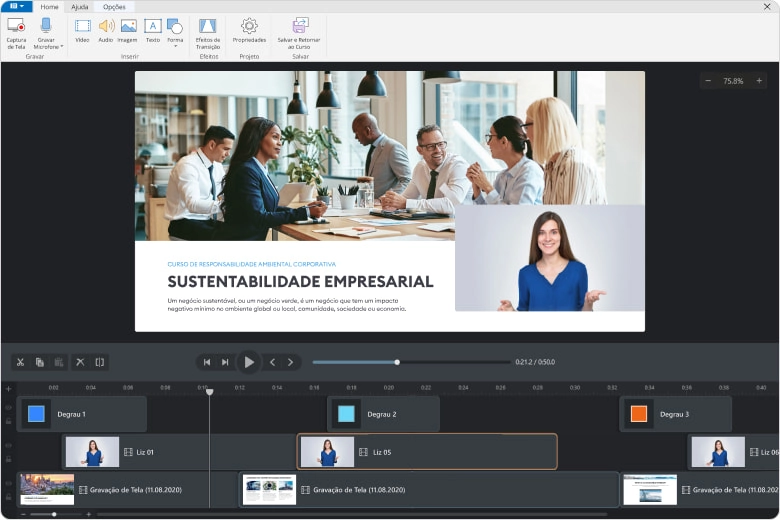
With iSpring Video Studio, you can quickly create great video tutorials with screencasts, video with talking characters, notes, tips and more. It's a great way to teach employees how to use a CRM or give a video lecture on sales techniques. Here are some of the main features of iSpring Suite:
Screen recording: With the screencast tool, you can select a recording area and add voice narration with microphone.
Interactive screen: In the studio, you can work with your video on an interactive screen. Add images, text blocks, shapes and other video files and edit them like in PowerPoint.
Multitrack Timeline: With an unlimited number of tracks, you can add as many layers as you need. It is possible to merge videos from multiple tracks, add audio and even show two videos at the same time.
Title Screens and Annotations: Start a video course with a bright, compelling intro, or add highlight slides to any snippet in your video. Use predefined images or create annotations, graphics and captions directly in the video editor.
Seamless transitions between scenes: Smooth transitions between videos, info slides and photos. For example, you can adjust transition effects to turn images into videos and videos flow smoothly back into images.
Visual Tips: During screen recording, iSpring Suite detects when you use hotkeys, enter text or click and automatically adds tooltips to the screencast. Easily demonstrate how to use the software or explain the meaning of options and buttons.
Picture-in-picture: Record video of your screen and webcam simultaneously to provide a screencast with live video commentary. Show both videos at the same time or alternate between them.
Slow and fast motion: Add a slow motion effect to show things that might be missed at normal speed, or speed up the video to demonstrate a long process more quickly.
Frame Freeze: Keep a specific frame “paused” for the desired duration. This allows you to add a comprehensive narrative explanation or textual commentary to that part.
iSpring Suite is an excellent tool for creating quality tutorial videos with a wide range of features and customization options. With the ability to adjust transition effects, add voice narration, and create annotations, graphics, and captions, you can be sure your video will look professional. Add to this the option to record screen and webcam video simultaneously, the slow and fast motion effect, and frame freeze, and you have a complete tool for creating excellent tutorial videos.

Branching Scenarios: The iSpring Suite dialog editor presents the dialog simulation as a tree, allowing you to create the first scene and add branches easily via drag and drop. Each branch represents an alternative scenario that could occur depending on student responses.
Backgrounds and Characters: The iSpring Suite allows you to choose a character and location that best matches your learning scenario. For each scene, it is possible to specify the character's emotions. The built-in library offers locations and characters, but you can also upload your own files.
Points: It is possible to assign points for correct answers and apply penalties for errors, allowing students to gain or lose points in each scene. The final score will accurately show the student's performance.
Dialogue Voiceovers: To fully simulate a real-life conversation, the iSpring Suite provides the option to add voiceovers to your character's speech. You can import audio or record voiceovers directly in the dialog editor.
Feedback messages: iSpring Suite allows you to explain to students why the choice they made was not the best one or how to correct a mistake through feedback messages. You can enhance them with links to useful material on the subject, offering a more complete and interactive learning experience.
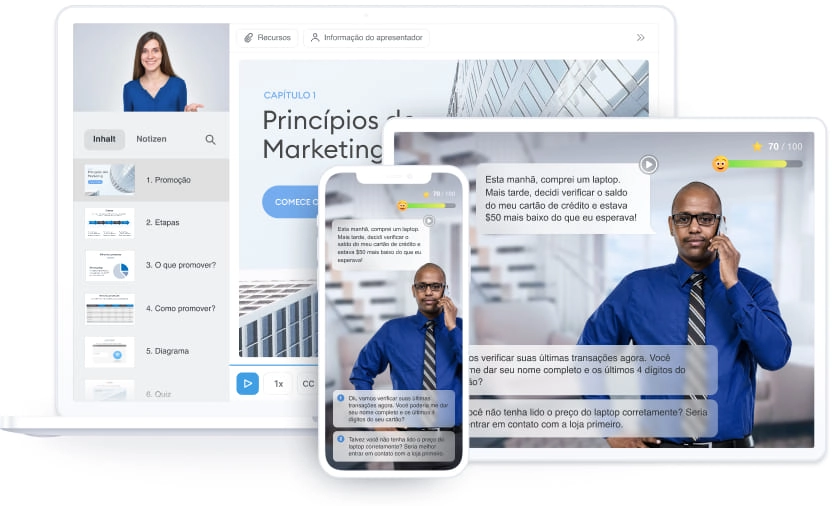
Publishing an online course can be a challenging task, but with iSpring Suite, you can do it quickly and easily. Additionally, iSpring offers multiple publishing options to ensure your content is available on any device and LMS.
Publish to the web: make your course available in HTML5 format for any device, be it PC, laptop, tablet or smartphone. You can also publish your course in .mp4 video format or upload it directly to YouTube from iSpring Suite.
Publish to an EaD: iSpring meets all modern eLearning standards including cmi5, xAPI (Tin Can), SCORM 2004, SCORM 1.2 and AICC. This means you can prepare your course for upload to any LMS.
Publish to iSpring Learn: Log in to your iSpring Learn LMS account from the iSpring Suite and publish your courses to the LMS with just one click.
Publish to iSpring Space: Quickly upload your courses to iSpring Space directly from PowerPoint. Share a short link with others so they can review your content and provide feedback.
Play on mobile devices: iSpring courses are adaptable to any screen size and work perfectly on iOS, Android and Windows Phone.
Accessibility: Make your tests, polls, and interactions available to visually impaired students by publishing them in accessibility mode. High-contrast minimalist design is screen reader friendly.
With iSpring Suite, you have the possibility to publish your course in different formats and LMS, in addition to ensuring the accessibility of your content. Plus, your students can access the course from any device, making the learning experience more flexible and convenient.
iSpring Suite offers several advantages that make it an excellent choice for creating and publishing e-learning courses. With this powerful tool, you can enjoy fast and easy publishing to your Learning Management System (LMS). iSpring Suite supports multiple publishing formats including HTML5, .mp4 video and even direct upload to YouTube.
In addition, iSpring Suite is compatible with the most modern e-learning standards such as cmi5, xAPI (Tin Can), SCORM 2004, SCORM 1.2 and AICC. This means you can prepare your courses to be uploaded and used in any LMS you prefer.
If you use iSpring Learn, the publishing process is even easier. With just one click, you can log into your iSpring Learn LMS account and publish your courses directly there.
iSpring Suite also offers integration with iSpring Space, a platform that allows sharing courses in a practical and fast way. Share a short link with others so they can review your content and provide valuable feedback.
Furthermore, courses created with iSpring Suite are fully responsive and adaptable to any screen size. This means your students will be able to access the content on any device, be it a PC, laptop, tablet or smartphone.
Finally, iSpring Suite is also concerned with accessibility. You can make your tests, polls, and interactions available in accessibility mode, with a minimalist, high-contrast design that's compatible with screen readers.
In summary, the key benefits of iSpring Suite include fast and easy publishing, multi-format and LMS compatibility, integration with iSpring Learn and iSpring Space, mobile playback, and accessibility features. With all these benefits, the iSpring Suite offers a flexible, hands-on, high-quality learning experience.
For more information on iSpring Suite pricing and licensing, please complete the form and our team at OSB Software will get back to you as soon as possible.
iSpring Suite offers different licensing options, allowing customers to choose the one that best suits their needs. iSpring Suite pricing varies by license type and number of users.
For specific information on iSpring Suite pricing, it is recommended to contact OSB Software, official iSpring Suite partner. The OSB Software team is ready to provide all the necessary details about licensing options and associated costs.
Additionally, OSB Software can provide additional support and custom services to assist with the implementation and utilization of the iSpring Suite, ensuring a complete and satisfying experience for customers.
Thus, when contacting OSB Software, interested parties will be able to obtain detailed information on iSpring Suite costs and find the solution that meets their needs and budget.
The OSB Software team is ready to provide personalized guidance and help you find the right solution for your needs and budget.
iSpring Suite is a powerful tool for creating high-quality, interactive e-learning courses. If you are interested in using this innovative solution, you are in the right place! In this article, we'll show you step-by-step how to start using iSpring Suite.
Download and install: First, go to the official website of OSB Software, our official iSpring Suite partner, and download the software. Follow the installation instructions to configure iSpring Suite on your computer.
Explore the features: After installation, it's time to explore the features of iSpring Suite. It offers a wide range of features such as creating interactive presentations, creating quizzes and tests, adding videos and audios, among others. Familiarize yourself with all available functionality to take full advantage of iSpring Suite's potential.
Create your first course: Now that you're familiar with the features, it's time to get your hands dirty and create your first course. Use iSpring Suite's intuitive tools to add content, interactivity and customize your course design.
Publish your course: After creating your course, it's time to publish it and make it available to your students. iSpring Suite offers a variety of publishing options, such as exporting the course to HTML5, creating a SCORM package, or publishing directly to online learning platforms.
Get support from OSB Software: If you have questions or need additional support, you can count on the OSB Software team. They are ready to help and provide guidance to ensure you have a smooth and successful experience with iSpring Suite.
Now that you know how to use iSpring Suite, don't waste time and start creating amazing e-learning courses.
Checking the system requirements is critical before installing or using software on your computer. This ensures that your system meets the minimum requirements for the software to function properly and provide the best possible user experience.
To use iSpring Suite, you must have a system that meets the following requirements:
• CPU: 1.8 GHz dual core processor
• RAM: 2 GB
• HDD / SSD: 50 GB of free space on the main drive
• Operating System: Microsoft Windows 10, Microsoft Windows 8 (32-bit), Microsoft Windows 7 (32-bit) and Microsoft Windows Vista (32-bit)
• Resolution: 1024×768
If you are interested in using the software in question, make sure your computer meets the minimum and recommended requirements to ensure the best experience possible. Check your computer's specifications and, if necessary, perform a hardware upgrade before using the software.
Remember: checking the system requirements is an important step in ensuring your computer's functionality and security, as well as preventing problems when using software.
You don't know what software you need or you haven't found what you were looking for? We have a team ready to help you choose the right software for your company.